I have no light to shed about how to install shit in DS I tried it confused me so I ran back to poser. Anywhodle, a word of advice. Learn how runtimes are supposed to be set up because alot ALOT of freebies are not set up right (even some paid stuff isn't). As far as I know as long as the runtime structure is correct it should work for DS as long as you are putting it in the proper folder (content).
*gives you sammich*
Questions About Content
After much searching, I have come to the conclusion that I am either blind or clueless when it comes to content that doesn't come with an installer, like V4 and other models. Like I said in my introduction thread, I am really new to digital artwork. It's something that I've always looked at from the other side of the glass and thought "Damn, I wish I could do that." Well now that I'm trying my hand at it, I see how confusing certain aspects of it can be. I had been messing around with some of the default content that comes with Daz to make some "okay" stuff, so I had never encountered this problem until I tried to get something from a different website. I have scoured tutorials on Daz's website, Renderosity, YouTube, and here, and I can't find the answers for the questions that I have.
My content folders lies behind the path User/Documents/DAZ 3D/Studio 3/content. One of the tutorials that I watched from Daz on Youtube, said that until a novice user becomes comfortable with the program that all content should go in the folder listed above. So like a good little nublet, I put a few things that I thought I'd try from VAMP (I know that most of you all that create content for VAMP play around here, which is why I thought this would probably be my best place to ask) into said content folder above. I don't think that was the right place to put it, because the end result was me completely uninstalling and reinstalling Daz after a bunch of my "default" content wouldn't work.
I know this is long winded, and I'm sorry, but I just feel kinda overwhelmed. It seems that there are lots of tutorials for certain things, but then the things that I am looking for, and would like a step by step instructional for, just to make sure I don't screw things up myself, I can't find. So if any of you could offer a little guidance, or even if you don't feel like explaining it yourself, know of a place I could find this information in detail to help myself, I would be incredibly grateful. Thanks a ton in advance.
Kat
Late Edit: So after even more searching, I found this old tutorial about installing and finding new content. http://www.tuitzone.com/DSTut_07
From what I can understand, is that, all content will go into the default file setting that I listed above, even .zip files. So if that's true, then I don't understand why the files I got and installed into that exact file setting messed up my default content and caused it not to run right. Can someone please tell me if I'm installing these files right by installing them into the user/documents/daz3d/studio3/content folder?

Laschae
15 years ago

Lessa
15 years ago
You want to install your content to User/Documents/DAZ/Studio/content
Also there is a flaw with daz3 where you need to remove one of the files in order for it to load new items properly, you might try this first just incase I am wrong and you can in fact install to the daz 3 folder. Go into your Daz3/DazStudio3 folder, to Resources and Content map files. Cut the Contentmapfiles folder out.. ( you can paste it into another file if you like, but I've never had any issue with it missing.. its like pulling tonsils) it should then load the new content properly without needing to do a search every time. You might want to try this first and see if that helps to find your missing items.. and if not then reload to the above route. 🙂
If you buy a texture, and do not have the base/required item, then too of course you will not be able to use it, so make sure when you buy something you either have the base item for it, or that it is an object and not a texture. Sometimes products will list multiple required items, thats ok, you don't always need all of them, they are just options.
Also there is a flaw with daz3 where you need to remove one of the files in order for it to load new items properly, you might try this first just incase I am wrong and you can in fact install to the daz 3 folder. Go into your Daz3/DazStudio3 folder, to Resources and Content map files. Cut the Contentmapfiles folder out.. ( you can paste it into another file if you like, but I've never had any issue with it missing.. its like pulling tonsils) it should then load the new content properly without needing to do a search every time. You might want to try this first and see if that helps to find your missing items.. and if not then reload to the above route. 🙂
If you buy a texture, and do not have the base/required item, then too of course you will not be able to use it, so make sure when you buy something you either have the base item for it, or that it is an object and not a texture. Sometimes products will list multiple required items, thats ok, you don't always need all of them, they are just options.

Katrizi
15 years ago
Thanks so much for your replies guys. I think my biggest issue was nubletness and over complicating things myself that didn't need to be. You know how sometimes when you want something to work so much you over analyze and stuff? Yea that's usually my problem :P.
One of the things that I downloaded required 4.2++ morphs, so I got that squared away. I think the only thing that I'm missing now is, I downloaded Destinations by Eve: Fire and Ice since they're so pretty and will go with a couple things I wanted to make..plus they were free (thanks). I read the "readme" that came with the zip and it says to install the backgrounds into wherever you normally put them, which I guess is my content folder. But I'm again, not seeing them in Daz. Maybe I'll have to fish around a little bit more.
I wanted to post a screenie of my Daz UI with how I've got some stuff set up, because it would probably give you guys that are so awesomely trying to help, a better insight of how I've FUBAR'd my own stuff. lol. Also, the tutorial I was reading about installing content did mention something about knowing how runtimes are *supposed* to be set up, stating that sometimes people mess that up or whatever. So I have that part of the tut saved for future reference, but I appreciate the word of advice Laschae 🙂 It's definitely something that I am going to have to be watchful of until I get more comfortable with the program. This stuff is not your normal sketchpad and charcoal...so complicated sometimes 🙂
Thanks again for your replies, you guys are great 🙂
Kat
One of the things that I downloaded required 4.2++ morphs, so I got that squared away. I think the only thing that I'm missing now is, I downloaded Destinations by Eve: Fire and Ice since they're so pretty and will go with a couple things I wanted to make..plus they were free (thanks). I read the "readme" that came with the zip and it says to install the backgrounds into wherever you normally put them, which I guess is my content folder. But I'm again, not seeing them in Daz. Maybe I'll have to fish around a little bit more.
I wanted to post a screenie of my Daz UI with how I've got some stuff set up, because it would probably give you guys that are so awesomely trying to help, a better insight of how I've FUBAR'd my own stuff. lol. Also, the tutorial I was reading about installing content did mention something about knowing how runtimes are *supposed* to be set up, stating that sometimes people mess that up or whatever. So I have that part of the tut saved for future reference, but I appreciate the word of advice Laschae 🙂 It's definitely something that I am going to have to be watchful of until I get more comfortable with the program. This stuff is not your normal sketchpad and charcoal...so complicated sometimes 🙂
Thanks again for your replies, you guys are great 🙂
Kat
Lessa
15 years ago
Eve's bg's are jpegs, so you just need to use an editing program to load them into your backgrounds. You cant really install them in daz, just unzip them into a folder labeled for backgrounds that you can access from your editing program and you should be all set.
When you render in Daz, you need to make sure you're rendering your images as PNG images.. that will give you a clear background, and you can add layers behind it in Gimp or Photoshop or PsP or whatever editing program you use. 🙂
When you render in Daz, you need to make sure you're rendering your images as PNG images.. that will give you a clear background, and you can add layers behind it in Gimp or Photoshop or PsP or whatever editing program you use. 🙂

Kilandra
15 years ago
Thanks for this, all of it! 😃
Katrizi
15 years ago
Thanks Lessa 🙂 You are so quick to respond and so smart about this stuff. I imagine you have been doing this for a really long time. I wish I had picked this up sooner, because some of the really pretty clothing I want to use on my models is no longer available. I was browsing through Renderosity and I found some awesome pieces by AerySoul. A lot of people had made some pretty textures for this and without thinking about having to have the base files for White Rose, I downloaded the textures, which I now can't use because I can't find White Rose for sale anywhere, not even on AerySoul's website. I know a lot of their pieces don't work in Daz and if I could figure out how in the hell to run Poser Pro 2010 the right way I'd use it, but I thought it seemed more complicated than Daz.
That's basically where I am now, a lot of the clothes I want to use are no longer available, and I'd gladly pay for them, if they were for sale Other than that, I've gotten pretty decently far with the basic stuff you get when you install Daz, so I'm learning, be it slowly. Could any of you recommend some nice hair ( my girls are bald atm!) and some pretty clothes -like- the stuff from AS?
Thanks again for everything 🙂
Kat
That's basically where I am now, a lot of the clothes I want to use are no longer available, and I'd gladly pay for them, if they were for sale
Other than that, I've gotten pretty decently far with the basic stuff you get when you install Daz, so I'm learning, be it slowly. Could any of you recommend some nice hair ( my girls are bald atm!) and some pretty clothes -like- the stuff from AS? Thanks again for everything 🙂
Kat
Lessa
15 years ago
Lol! Ive been doing 3d for about 4 years or so.. I think, but most of the others here are far better and far more experienced than I am. I'm just a forum addict. ><
Aery Soul is in the process of moving to RDNA. Already some of their items have popped up there under new names ( new seller name too but it's still them) So in the future the AS pieces you like may well turn up there. http://www.runtimedna.com/AlfaSeed/
They are also at Daz http://www.daz3d.com/i/shop/artistlist?artist=18727&_m=d
As for hair, I like anything by Pretty3d, Vaia, Lady Littlefox, Nirvy, Aery Soul (( Alfaseed) though theirs is usually really memory intensive) and Out Of Touch. Those are usually my faves, but there are others that are very good as well.
I suggest investing in the Platinum Club at Daz.. it pays for itself in the long run... I make sure to get myself a year sub for my b-day every year, heh. But with that there are tons of props and outfits and hair pieces you can get for under 2 bucks.
Aery Soul is in the process of moving to RDNA. Already some of their items have popped up there under new names ( new seller name too but it's still them) So in the future the AS pieces you like may well turn up there. http://www.runtimedna.com/AlfaSeed/
They are also at Daz http://www.daz3d.com/i/shop/artistlist?artist=18727&_m=d
As for hair, I like anything by Pretty3d, Vaia, Lady Littlefox, Nirvy, Aery Soul (( Alfaseed) though theirs is usually really memory intensive) and Out Of Touch. Those are usually my faves, but there are others that are very good as well.
I suggest investing in the Platinum Club at Daz.. it pays for itself in the long run... I make sure to get myself a year sub for my b-day every year, heh. But with that there are tons of props and outfits and hair pieces you can get for under 2 bucks.

KaAnna
15 years ago
I agree with Lessa on the Platinum Club thing. It pays for itself so quickly. There is so much amazing stuff in there. It's either $100-some for the year, or $30 upfront and then $7-$8 per month. It's awesome! Also, you get vouchers every month from Daz if you are in the Plat Club.
I cannot recommend Littlefox's hair MORE. They are all amazing. In fact, all of Littlefox's stuff is top notch.
There are a lot of awesome artists out there that make this stuff with my own personal favorites:
Littlefox (RuntimeDNA.com = RDNA)
Val3DArt (Renderosity.com and Daz3d.com = Rendo and Daz)
Xurge3D (Xurge3D.com)
BadKittehCo (Daz and Rendo)
Orion1167 (Daz)
and so many more!
As for AerySoul's.. Alfaseed's.. stuff. They normally do work in Daz. Actually they made a really good habit of creating materials just for Daz, especially towards the end of their AerySoul run. The objects themselves always work. Sometimes the materials just need tweaking.
I cannot recommend Littlefox's hair MORE. They are all amazing. In fact, all of Littlefox's stuff is top notch.
There are a lot of awesome artists out there that make this stuff with my own personal favorites:
Littlefox (RuntimeDNA.com = RDNA)
Val3DArt (Renderosity.com and Daz3d.com = Rendo and Daz)
Xurge3D (Xurge3D.com)
BadKittehCo (Daz and Rendo)
Orion1167 (Daz)
and so many more!
As for AerySoul's.. Alfaseed's.. stuff. They normally do work in Daz. Actually they made a really good habit of creating materials just for Daz, especially towards the end of their AerySoul run. The objects themselves always work. Sometimes the materials just need tweaking.
Katrizi
15 years ago
Thanks guys I'll check those links out. I thought about doing Platinum Club, if I'm going to be buying a bunch of stuff it seems the smart way to go. I wish you could see my wishlist on Daz3D..700 dollars! I about choked, I thought to myself "This is why I don't shop online." lol! So I will definitely look into the Platinum Club.
There are a few pieces from AerySoul that I know in the readme/product information said that it only worked in Poser. I think it was the Classic Fantasy stuff, which I'm dying to have. It seems most of their body jewelry is made for Poser and will not work in Daz, from what I gathered. I could just be out of it, I had blood drawn today after a 12 hour fast and I still feel foggy. I'm also having withdrawls of playing EQ2. This whole mess with Sony, hackers, and compromised security has screwed with my plans for the night. I shall do some digging on those links though. 🙂
Kat
There are a few pieces from AerySoul that I know in the readme/product information said that it only worked in Poser. I think it was the Classic Fantasy stuff, which I'm dying to have. It seems most of their body jewelry is made for Poser and will not work in Daz, from what I gathered. I could just be out of it, I had blood drawn today after a 12 hour fast and I still feel foggy. I'm also having withdrawls of playing EQ2. This whole mess with Sony, hackers, and compromised security has screwed with my plans for the night. I shall do some digging on those links though. 🙂
Kat
KaAnna
15 years ago
Hahah, $700. I hate to say it, but that is a very small amount. Just wait until you get through a lot of the store. It will SKYrocket. hahah
Another thing about the Platinum Club, you get 30% off Daz Originals as well!
Yeah, really sorry about the Sony crap going on. I never bought a PS3, so luckily dodged that bullet. But, man. :/ must be a crapstorm lol
As for the Classic Fantasy, you're right. The materials don't work at all in Daz Studio. However, the objects do. Like, you can load them and fit them to V4 fine. But you'll have to set up your own materials (or use custom downloaded ones). 😃
Another thing about the Platinum Club, you get 30% off Daz Originals as well!
Yeah, really sorry about the Sony crap going on. I never bought a PS3, so luckily dodged that bullet. But, man. :/ must be a crapstorm lol
As for the Classic Fantasy, you're right. The materials don't work at all in Daz Studio. However, the objects do. Like, you can load them and fit them to V4 fine. But you'll have to set up your own materials (or use custom downloaded ones). 😃
Lessa
15 years ago
In um.. I think June or July, there is a PC store wide sale, and they do crazy discounts on stuff that aren't neccisarily PC items. You can buy 200 or 300 dollar programs for a couple of bucks.. that's when I tend to spend the most.. when Daz does some of their huge sales. ><
I think most of us have about $500-800 dollars worth of wishlist totals.. per store! >< Trick is to buy when you have vouchers or coupons or sales. 🙂
I think most of us have about $500-800 dollars worth of wishlist totals.. per store! >< Trick is to buy when you have vouchers or coupons or sales. 🙂
KaAnna
15 years ago
Am I the only one with $4,000 wishlist (that's just Daz)? lolol ;D
Yeah be very wary of some dates for some of these stores. RDNA has an annual 50% off sale. Daz has their PC Anniversary and their Published Artists Sale. They also have March Madness. And then anything random they decide to do. ;D I can't remember any of these dates though, sorry! lol
Yeah be very wary of some dates for some of these stores. RDNA has an annual 50% off sale. Daz has their PC Anniversary and their Published Artists Sale. They also have March Madness. And then anything random they decide to do. ;D I can't remember any of these dates though, sorry! lol

Eve
15 years ago
Good lord KaAnna! Thought mine was bad sitting right under $1500! ROFL Don't wanna think about Rendo's. Course it could use some serious cleaning out. Oh and Kat, you're quite welcome for the freebie 😉 I have another set I did all in PhotoShop that's over in my DA account, let me find that for ya. http://designsbyeve.deviantart.com/gallery/#/d2m3zge There ya go! Handy for a quick background 🙂
KaAnna
15 years ago
Oh gosh, I wonder which wishlist is bigger, Daz's or Rendo's o_O But yeah, some stuff could probably get cleaned out. I know I've got a few v3 things that I'll probably never buy.
Eve's backgrounds are awesome, fo sho ;D
Eve's backgrounds are awesome, fo sho ;D
Lessa
15 years ago
I get nervous when mine gets close to $900 and I weed it out ><
I have no clue how much my rendo one is.. prolly at least double though.
I have no clue how much my rendo one is.. prolly at least double though.
Katrizi
15 years ago
Sweet! Thanks so much Eve! Those backgrounds are really nice. The wooded area with the fireflies is my FAV 😃 You know I think it's hilarious when I go to the DA Galleries of some of you girls and I see art that's in my house in EQ2:P You guys are just too much! <3
Kat
Eve;105856
Good lord KaAnna! Thought mine was bad sitting right under $1500! ROFL Don't wanna think about Rendo's. Course it could use some serious cleaning out. Oh and Kat, you're quite welcome for the freebie 😉 I have another set I did all in PhotoShop that's over in my DA account, let me find that for ya. http://designsbyeve.deviantart.com/gallery/#/d2m3zge There ya go! Handy for a quick background 🙂
Sweet! Thanks so much Eve! Those backgrounds are really nice. The wooded area with the fireflies is my FAV 😃 You know I think it's hilarious when I go to the DA Galleries of some of you girls and I see art that's in my house in EQ2:P You guys are just too much! <3
Kat
Lessa
15 years ago
Lol, that was a fun contest. I want to do that again.
Katrizi
15 years ago
Okie doke. So I have been messing around more and found some stuff I liked but I need some help. I'll post the picture of just the model rendered with the clothes and see if anyone can help me 🙂
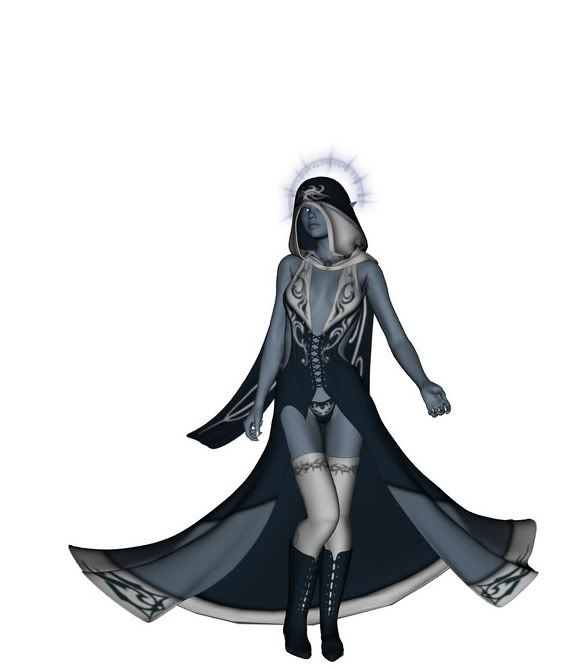
I'm sure you all are familiar with the clothing, but it's Dementia by Val3Dart. It's gorgeous and it's what I want for this piece, but I would rather do without the hood, so I can add some hair. Also, to any of you who are familiar with working with this set of clothing, is there a way I can change the colors? Kinda wanted black and silver or something. This is as far as I've gotten but I've got a lot of great ideas to add to it, just need help on a few things. Anything at all is appreciated.
Thanks,
Kat
Edit: Also, if there's anything that you'd like to CC about this piece, please go ahead, as I'm quite the nib and need as much constructive criticism as I can get. This piece is far from finished, obviously, I need a background and to tweak the pose some, but it's my first real good attempt at making a portrait for my EQ2 conjuror. 🙂
I'm sure you all are familiar with the clothing, but it's Dementia by Val3Dart. It's gorgeous and it's what I want for this piece, but I would rather do without the hood, so I can add some hair. Also, to any of you who are familiar with working with this set of clothing, is there a way I can change the colors? Kinda wanted black and silver or something. This is as far as I've gotten but I've got a lot of great ideas to add to it, just need help on a few things. Anything at all is appreciated.
Thanks,
Kat
Edit: Also, if there's anything that you'd like to CC about this piece, please go ahead, as I'm quite the nib and need as much constructive criticism as I can get. This piece is far from finished, obviously, I need a background and to tweak the pose some, but it's my first real good attempt at making a portrait for my EQ2 conjuror. 🙂
Lessa
15 years ago
There is a texture set by Lillannya that has a black and silver texture set.. it also has a hood dissappear morph. 🙂 http://www.vamp3d.com/store/sorcery-for-dementia
There is also a set by ShanaC that has a black set http://www.renderosity.com/mod/bcs/eclipse-for-dementia/64036
The textures aren't made for Daz, but they can be tweaked to work nicely.
I do notice that her leg is poking through the front of the skirt a bit.
It also appears that you have not added any lights yet, or that the lights do not have shadows turned on. Figuring out lighting and shadows is going to make a huge impact on your 3d images in the long run.
There is also a set by ShanaC that has a black set http://www.renderosity.com/mod/bcs/eclipse-for-dementia/64036
The textures aren't made for Daz, but they can be tweaked to work nicely.
I do notice that her leg is poking through the front of the skirt a bit.
It also appears that you have not added any lights yet, or that the lights do not have shadows turned on. Figuring out lighting and shadows is going to make a huge impact on your 3d images in the long run.
Katrizi
15 years ago
Wow those are gorgeous..I'm going to go broke doing this as a hobby aren't I? 😛 Oh well it's fun! So do I have to take the hood with the rest of the clothing? I was kind of hoping for not covering her head up so I can make it into a signature for myself and put a lot of detail into her face and hair.
Also, no I haven't added any lighting as of yet, but I am going to, I basically posted this picture to give an idea of what I was looking for in terms of clothing, and to see if I could change the color and nix the hood. But thanks for the advice, I'll tweak the pose some more. I notice in Lillannya's texture set, she's got the sleeves on without the big shoulderpads. I didn't know that was possible with this one, or is it just that her textures don't require it? I wouldn't mind to use the sleeves at all, I just didn't want those shoulderpads if it could be helped. I'm trying to keep it close to the kind of gear my toon would wear, and I just can't see a small dark elf caster wearing big ol' shoulderpads :P
Thanks a bunch 🙂
Kat
Also, no I haven't added any lighting as of yet, but I am going to, I basically posted this picture to give an idea of what I was looking for in terms of clothing, and to see if I could change the color and nix the hood. But thanks for the advice, I'll tweak the pose some more. I notice in Lillannya's texture set, she's got the sleeves on without the big shoulderpads. I didn't know that was possible with this one, or is it just that her textures don't require it? I wouldn't mind to use the sleeves at all, I just didn't want those shoulderpads if it could be helped. I'm trying to keep it close to the kind of gear my toon would wear, and I just can't see a small dark elf caster wearing big ol' shoulderpads :P
Thanks a bunch 🙂
Kat