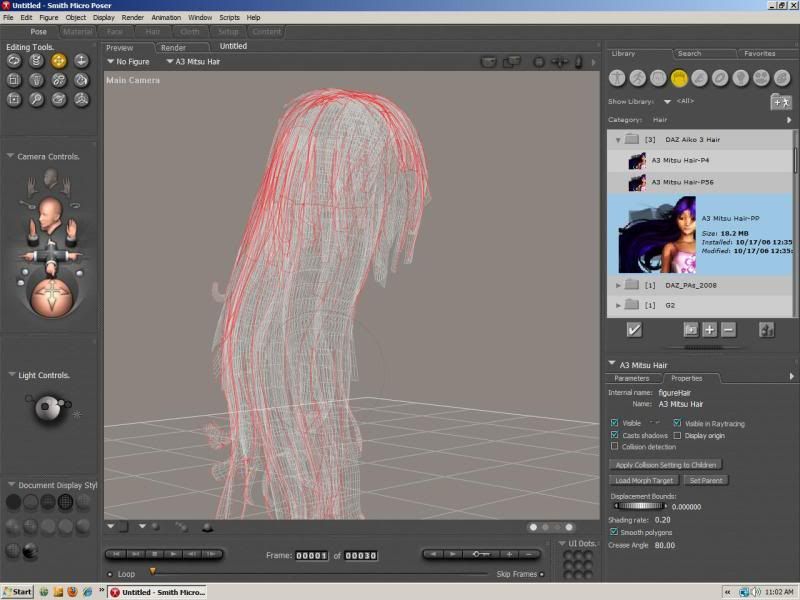
Ive had hair look like that in the scene set up, but when rendered it looks normal.
The pirate pic I just did was like that.
Mitsu hair
anyone else have this problem?? using poser 8, have to add the textures myself and they still look like this.

Lessa
16 years ago

Vex
16 years ago
its got to do with the figure mode set to wireframe, you can change it in 1 of the menus at the top, there's document / figure / element mode, and each one has a bunch of options, choose 'texture shaded'

Faeini
16 years ago
thanks guys!! :)
Lessa
16 years ago
Yeah, mine was texture shaded, unless there was a way to assign settings per obj, the hair was the only thing in the scene that appeared in wire frame, I thought it was strange, but it rendered fine so I didnt worry about it.

Eve
16 years ago
Yup you have to check not just the "body" of the hair, but sometimes the neck/head/chest, where ever they happen to have the morphs usually. Basically, click on the hair itself. Chances are whatever body part comes up when you do that, that's where your morphs are and where you need to check the display settings.